
Deposit Guide: Funding Your 1King Account with Card or Crypto
Adding funds to your 1King account takes a few taps once you open the deposit screen in your account panel: choose between a bank card (Visa/Mastercard) or a crypto transfer. This page covers how each method works, how long processing takes, and how your first deposit connects to the welcome bonus.
Available Deposit Methods
The deposit screen in your account lists the same options regardless of the device you're using. The bank card option accepts Visa and Mastercard; the crypto option is completed by sending funds to a wallet address shown in your panel.
| Method | Processing Time | Notes |
|---|---|---|
| Bank Card (Visa/Mastercard) | Up to 10 minutes | Card details are entered on the deposit screen |
| Crypto | Up to 10 minutes | Wallet address is shown in your account panel |
Both methods are credited to your balance in up to 10 minutes — the same window the Help Center states for card and crypto alike. Once the transaction is confirmed, your balance updates in TRY inside your panel.
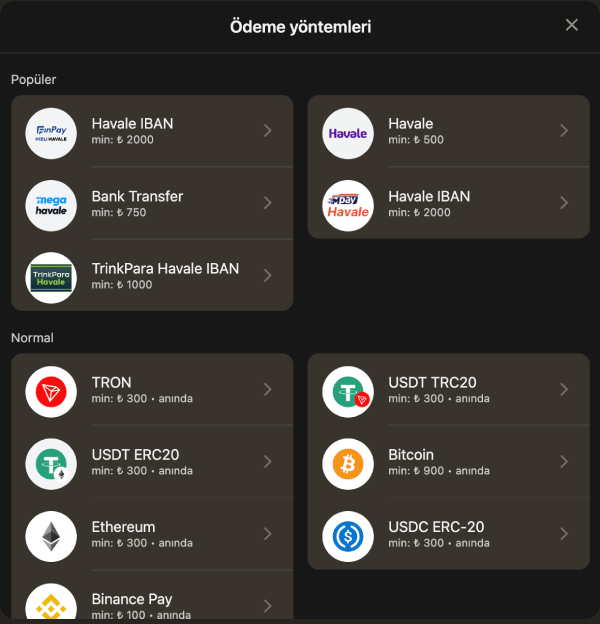
Step-by-Step Deposit Process
- Log in to your account and open the Deposit link from the top menu.
- Select either the bank card or crypto option.
- Enter the details the method requires — card information or the amount you plan to send.
- Enter the amount you want to deposit; the applicable limit for your chosen method is shown on screen.
- Confirm the transaction and wait for your balance to update in the panel.
The fields on screen change depending on the method, but the confirmation step follows the same order either way — select method, enter amount, confirm.
Minimum and Maximum Deposit Amounts
1King does not publish a single site-wide minimum or maximum deposit figure. The limit that applies to you is shown only inside your account's deposit screen, specific to the method you select, and it can differ between bank card and crypto. Checking the on-screen figure before you deposit is the reliable way to confirm what's available to you.
Rather than looking for a fixed number, treat the amount shown in your panel at the time of deposit as the current limit — it is method-specific and can't be assumed in advance.
First Deposit and the Welcome Bonus
If you selected a bonus package during registration, activating it requires a first deposit of at least 100 TL. The package is spread across your first four deposits; once your first deposit is confirmed, the matching rate and any free spins are applied to your account automatically. Full package rates and terms are listed on the welcome bonus page.
If you skipped the bonus package or a promo code at registration, you can still deposit — your balance is then treated as regular funds with no wagering requirement attached.
Do You Need Verification Before Depositing?
No — identity verification (KYC) is only required when you request a withdrawal, not before you deposit. A newly opened account can deposit and start playing before any documents are uploaded. The document list and verification steps are covered in full on the registration page.
How Deposits Connect to Withdrawals
When you request a withdrawal, you must use the same method you deposited with — funds deposited by bank card cannot be redirected to a different withdrawal method. This rule applies across all payment options and is worth keeping in mind when you choose how to deposit in the first place. The full withdrawal process is explained on the withdrawals page.
Depositing on Mobile
The deposit screen on a mobile browser follows the exact same steps as desktop, with no app to install. Bank card and crypto options are listed in the same order on a smaller screen, and processing time stays the same. More on mobile access is available on the mobile access page.
One Currency: TRY
Regardless of which method you deposit with, your balance is always displayed in Turkish Lira. A crypto transfer is converted and shown as its TRY equivalent once the transaction is confirmed, so casino and sports sections both draw from a single balance. If you deposit through more than one method over time, everything still consolidates into that same total — there's no need to track separate balances per method.
If a Deposit Doesn't Confirm
If your balance hasn't updated after the stated 10-minute window, refreshing the account panel is worth trying first — occasionally the display simply hasn't refreshed rather than the transaction failing. If the issue persists, contacting support with your transaction reference speeds things up. For crypto transfers, double-check that the amount and network you used match what the panel specified, since a mismatch is the most common reason a transfer isn't recognized automatically.
1King operates under a Curaçao Gaming Authority licence. Treat every deposit as entertainment spending rather than a source of income, and only deposit amounts you've planned for in advance as part of responsible play.
FAQ
How long does a deposit take at 1King?
Both bank card and crypto deposits are credited to your account in up to 10 minutes.
What is the minimum deposit amount?
No fixed minimum or maximum is published site-wide; the limit for your chosen method is shown in your account's deposit screen.
Do I need to verify my identity before depositing?
No, identity verification is only required before withdrawing. You can deposit and play before verification is complete.
Does my first deposit activate the welcome bonus automatically?
If you selected a bonus package at registration, a first deposit of at least 100 TL activates it automatically.
This page is for information only. Betting and casino games carry risk and are intended for players aged 18 and over.
Frequently Asked Questions
How long does a deposit take at 1King?
Both bank card and crypto deposits are credited to your account in up to 10 minutes.
What is the minimum deposit amount?
No fixed minimum or maximum is published site-wide; the limit that applies to your chosen method is shown in your account's deposit screen.
Do I need to verify my identity before depositing?
No, identity verification is only required before withdrawing. You can deposit and play before verification is complete.
Does my first deposit activate the welcome bonus automatically?
If you selected a bonus package at registration, a first deposit of at least 100 TL activates it automatically.