
1King Registration: How to Sign Up and Verify Your Account
Opening a 1King account takes a few minutes through either the Phone or Email tab. This page covers every field in the registration form, the one-account rule, identity verification requirements, and how to log in afterward.
Filling In the Registration Form
When the registration window opens, two tabs are available: Phone, which is selected by default with the country code preset to +90, and Email, an alternative for players who prefer not to share a phone number.
- Choose the Phone or Email tab.
- Enter your contact details; the Phone tab keeps +90 as the default country code.
- Set a password of at least 6 characters.
- Select a Welcome Bonus Package from the dropdown — it applies bonuses across your first four deposits.
- Optionally enter a promo code; this field is not required.
- Confirm the 18+ and terms checkbox (checked by default).
- Press KAYDOL (Sign Up) — the button stays inactive until every required field is filled.
Once submitted, your account opens instantly and your balance displays in TRY. How the selected bonus package applies across your first four deposits is explained on the welcome bonus page.
Bonus Package and Promo Code
The Welcome Bonus Package dropdown is a required step, described in the form as bonuses spread "between the 1st and 4th deposits." The promo code field, by contrast, is optional — registration completes whether or not you enter one. The exact rates, free spin counts and minimum deposit per instalment are listed on the welcome bonus page.
Phone or Email — Does It Matter?
Both tabs lead to the same account type; the only difference is which contact method identifies you. The Phone tab is faster for players in Turkey since the +90 code is already filled in. The Email tab works the same way for anyone who would rather not provide a phone number at sign-up — though phone verification is still required afterward regardless of which tab you used to register.
One Account Per Player
Each player is allowed only one account; creating or using more than one is not permitted under the platform's rules. A second account linked to the same person, email address, phone number, device/IP address or payment method is treated as bonus abuse and can lead to account restrictions — this applies whether the duplicate is caught at registration or discovered later, after the account has already been in use.
Your login details are yours alone. Sharing your password or letting someone else use your account — including family members — puts both your account security and your bonus eligibility at risk.
Identity Verification (KYC)
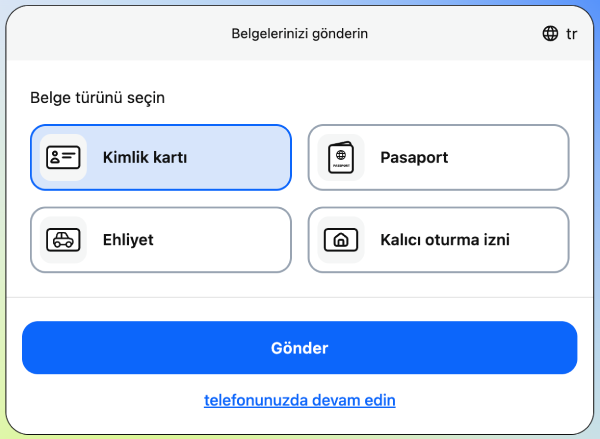
Withdrawing your winnings requires a verified account. The documents requested are:
- A colour copy of your passport (first two pages, plus any residency stamp) or a colour copy of your national ID card.
- A driving licence copy, if additionally requested.
- A utility bill as proof of address, if additionally requested.
Phone number verification is mandatory for every account. There is also an optional video verification call with an agent, with the language agreed in advance. If verification is not completed, bets can be cancelled, deposited funds can be withheld, and the account can be restricted.
No fixed verification timeframe is published — your account status updates in the panel once your documents have been reviewed. Full withdrawal rules are on the withdrawals page.
And deposit methods are covered on the deposits page.
Before withdrawing a newly deposited balance, support recommends wagering at least 100% of the deposited amount first. This isn't stated as a mandatory rule in the terms — it's advice passed on by support — so treat it as guidance for a smoother withdrawal rather than a fixed requirement.
Logging In to 1King
Once your account is open, use the "Login" link in the top menu and sign in with your phone number or email plus your password. Always reach the current 1King login address through the official site rather than links shared elsewhere.
If you forget your password, the Help Center's account section lists a password-recovery option; contact support directly for the exact steps. Logging in from a mobile browser follows the same order as desktop, with no separate app to install.
FAQ
What information do I need to register?
A phone number or email, a password of at least 6 characters, and 18+/terms confirmation. A promo code is optional.
Can I open a second account from the same device?
No — one account per player. A second account from the same person, device or payment method counts as bonus abuse.
I forgot my password when logging in — what now?
The Help Center's account section has a password-recovery option; contact support if you need the exact steps.
Can I deposit right after registering?
Yes, you can use the deposits page methods immediately; verification is only required before withdrawing.
This page is for information only. Betting and casino games carry risk and are intended for players aged 18 and over.
Frequently Asked Questions
What information do I need to register at 1King?
A phone number or email address, a password of at least 6 characters, and confirmation that you are 18+ and accept the terms. A bonus package is required; a promo code is optional.
Can I open a second account from the same device?
No. Each player may hold only one account; a second account from the same person, device or payment method is treated as bonus abuse.
I forgot my password when trying to log in — what should I do?
The Help Center's account section lists a password-recovery option; contact support directly if you need the exact steps.
Can I deposit right after registering?
Yes, you can deposit as soon as registration is complete. Identity verification is only required before you withdraw.